
Sonatype CLM Server - Policy Management
By now, we should know that an easy way to look at conditions is to consider
them the if part of an if/then statement. In contrast, a constraint is not
part of the statement, but rather a container for conditions. This can come in
real handy when you want to consolidate a policy, by grouping similar
conditions.
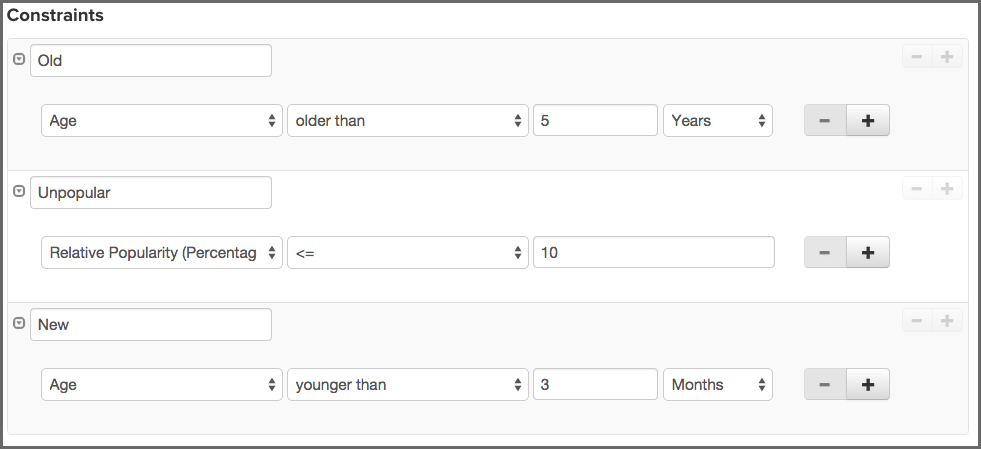
But why do this?
Well, for one thing, it reduces time. Next, because constraints are displayed on the application composition report, along with violations, it becomes easier for a member of your team to process information that is similar. Of course, it also has the added benefit of not having to create hundreds of small, one-off policies.
For example, in our Architecture Age and Quality policy, we may start with two conditions, one for age and one for popularity. This will work, but it’s likely better, especially if we want to expand that later on, we isolate these as separate constraints.
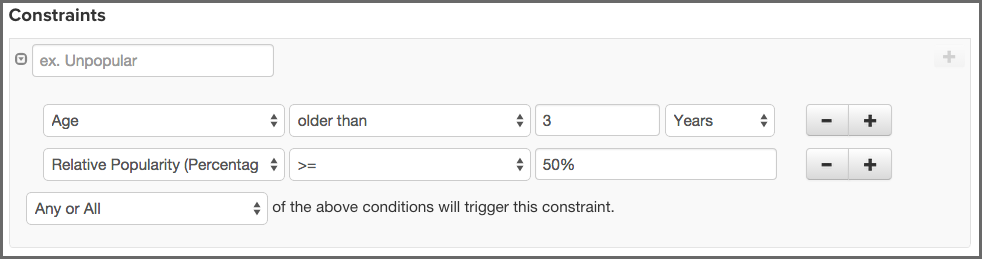
As a good practice, grouping similar conditions is the best way to build your constraints. Again, this will help de-clutter a multi-policy environment, as well as help someone reading any associated violations on the application composition report. For our example, we’ll be placing both conditions in the same constraint.
- Click on the Expand/Collapse icon (shaped like a right-facing triangle). It’s next to the Constraint Name and should display Unnamed Constraint.
- Once the constraint is expanded, click the Constraint Name field and enter Age and Popularity as the constraint name where the field initially displays Enter Constraint Name.
-
Using the drop downs and the add (+) button, add two conditions.
- Age should be checked to be older than the value of 3 Years.
- Relative Popularity (Percentage) should be set to be greater than or equal to (>=) 50 percent (50%).
- Select All in the drop down below the conditions as the aggregating rule so that all of the above conditions have to be fulfilled to trigger a policy violation for the constraint.
Now, before we move on, let’s take a look at some of the specific aspects of conditions that can tend to be a bit confusing.
Policy Type. Sonatype CLM has an algorithm for determining the type of policy you created. This type is based on the types of conditions you include and is mainly used in reporting purposes. For example the trending report aggregate the different policy types into separate lists. The rules to determine the type of a policy are:
- If there are any security conditions, it is considered a security type policy.
- If there are any license conditions, it is considered a license type policy.
- If there are any age or popularity conditions, it is considered a quality type policy.
- If there are any conditions not mentioned above, it is considered an other type policy.
Any vs. All. If a component meets any constraint, the policy is considered violated. However, inside each constraint, when you have more than one condition, you have the ability to require that a component must either meet all conditions or just any of the conditions to trigger a violation.
This is a straightforward concept, but it can produce vastly different results. For example, selecting Any as an option will tend to produce a lot more violations, it’s the equivalent of placing an or between each condition. In addition even if you resolve one violation for a component, if the component meets other conditions later on, it might cause it to still violate the policy. On the other hand, using All' allows you to establish that all conditions must be met. It’s like placing an and between each condition. In this case, if you address any of the conditions, the violation will be resolved.
Let’s look at an example that would further explain this, and then we will move on to creating conditions in our policy. Below, we have a couple of policies and a component. If we wanted to exclude components that were younger then four years and had less than fifty percent popularity, which would we want to use? Also, would the component listed violate this policy?
- Policy 1 with Conditions
-
- Age is < 4 years
- Relative Popularity is ⇐ than 50%
- Any of the above conditions trigger the constraint.
- Policy 2 with Conditions
-
- Age is < 4 years
- Relative Popularity is ⇐ than 50%
- All of the above conditions trigger the constraint.
- Component Data
-
- Age is 3 years
- Relative Popularity is 85%
It may seem like these two policies are exactly the same, but there is a key difference, Any vs. All. So, our first policy states that if Any of the conditions are met that a violation will occur. Given that, our component violates this policy. This is good, but we only want a component to violate a policy when Age is less than three years, and popularity is below 50%. We understand that there may be circumstances where a component might need to fall outside one of those boundaries, but if it’s both, we know we have a problem. Our component is pretty popular, so it might be a case where this component, even though it is newer than we prefer, actually resolves an issue another component might have. For this reason, the best policy for us to choose is Policy 2, and our component would not actually cause a violation.
- Available Conditions
- The following list enumerates the available conditions and describes the operator and the value used for the evaluation.
- Age
- Verify if the components age based on the date it was placed in the Central Repository in months, days or years is older our younger than a specified value.
- Coordinates
-
Verify if the coordinates for a component match or do not match (e.g. groupId:artifactId:version).
The coordinates may be fixed, or a wildcard can be used. For example, org.sonatype.com:nexus-indexer:1.*. Here, components with a groupId of org.sonatype.com, an artifactId of nexus-indexer, and any version starting with 1. would be matched.
![[Note]](images/icons/note.png)
This condition is only applicable for Maven components.
- Additional Examples
-
- A fixed coordinate: org.sonatype.nexus:nexus-indexer:1.0
- A wildcard coordinate to an inclusive group and version: org.sonatype*:nexus-indexer:1.* - this condition would match, for example org.sonatypetest or org.sonatype.example, an artifact named nexus-indexer in these groups, and any version that starts with 1. for those groups and that specific artifact.
The use of the wildcard is limited to the end of each parameter in the coordinate.
- Identification Source
- Verify if the component identification is or is not based on data from Sonatype or your Manual identification
- Label
- Verify if a label with a specific label name is or is not attached to a component
- License
- Verify if the component license is or is not a specified license. If the component license has been overridden, anything listed as declared or observed will be ignored. If license status is not overridden, then any occurrence of the selected license (observed or declared) will be considered a violation.
- License Threat Group
- Verify if the components license is or is not in one of the groups Banned, Copyleft, Liberal, Non Standard, Not Observed or Weak Copyleft. If the component license has been overridden anything listed as declared or observed will be ignored. If license status is not overridden, then any occurrence of the selected license (observed or declared) in the selected License Threat Group, will be considered a violation.
- License Threat Group Level
- Verify if the components license threat in its license threat group is either lesser <, lesser or equal <\=, greater > or greater or equal >= a specified value. Value range from zero for no threat to the highest threat level value of ten.
- License Status
- Verify if the user defined License Status is or is not one of the possible values of Open, Acknowledged, Not Applicable or Confirmed.
- Match State
- Verify if the match of the comparison of the component to known components from the Central Repository with the same coordinates is or is not exact, similar or unknown.
- Proprietary
- Verify if a component is or is not considered proprietary.
- Relative Popularity (Percentage)
- Verify if a the relative popularity of the component version as compared to other versions of the same component group and artifact parameter is either lesser <, lesser or equal <\=, greater > or greater or equal >= a specified percent value.
- Security Vulnerability
- Verify if a security vulnerability is present or absent. Keep in mind that just because there is no known, or present, security issue, doesn’t necessarily mean none exists.
- Security Vulnerability Severity
- Verify if a security vulnerability with a numeric severity is either lesser <, lesser or equal <\=, greater > or greater or equal >= a specified value.
- Security Vulnerability Status
- Verify if a the components security vulnerability status is or is not one of the possible values of Open, Acknowledged, Not Applicable or Confirmed.
Now that you know about all the available conditions and how they can be combined to match all or any condition to create a constraint we are ready to determine what should happen if a constraint is met - the policy actions.